Operations and Operation Analytics
The operation page is the page where you can see all the operations that have been made on your server. You can also see the analytics of those operations on this page (see the analytics button at the bottom of the page). The operations are the actions made on your server that are related to tokens. For example, when a user purchases a product, it is an operation. When a user sends tokens to another user, it is an operation. When a user charges another user, it is an operation. When a user purchases a product with real money, it is an operation. When a user receives tokens from a transaction, it is an operation. I think you get it now.
Operations
On the operations page, you can see all the operations that have been made by members on your server. You can see the type of the operation, the member/product that made the operation, the member/product that received the operation, the amount of tokens that have been sent/received/removed, and the date of the operation. You can also filter the operations by type.
Operation logging only registers operations that you are allowed to register with your subscription plan. If you are on the free plan, you don't have access to the operations and operations analytics. Refer to the ShopBot Pricing Page for more information.
Operations Cheat Sheet
Operation types are the different types of operations that can be made on your server. The operation type is the first column of the operations table.
| Option Type | Description |
|---|---|
| Product Operation | The operation was created due to a product purchase |
| Transaction | The operation was created due to a member-to-member transaction |
| Admin Operation | The operation was created due to a ShopAdmin operation (like /give or /remove) |
| User Charge | The operation was created due to a member charge (/charge) |
Operation emitter is the member/product that sent tokens. The operation emitter is the second column of the operations table. Operation receiver is the member/product that received tokens. The operation receiver is the third column of the operations table.
Here are all the different operation types and their emitter and receiver:
| Option Type | Emitter | Receiver |
|---|---|---|
| Product Operation | The member Discord ID that purchased the product if the product was bought for tokens (so the member used their tokens to buy the product), else it's the product ID (means that the member bought tokens in exchange for real money) | The member Discord ID that purchased the product if the product was bought for real money (so the member received tokens from the product), else it's the product ID (means that the member used tokens to buy the product) |
| Transaction | The member Discord ID that sent tokens | The member Discord ID that received tokens |
| Admin Operation | The member Discord ID that received tokens if it was a "give tokens" operation; else it's the admin Discord ID | The admin Discord ID that received tokens if it was a "remove tokens" operation; else it's the member ID |
| User Charge | The member Discord ID that was charged for tokens | The member Discord ID that received the tokens (so they emitted the charge to the member) |
The Token Change column is a summary of the operation. It is the amount of tokens that have been sent/received/removed. The Date column is the date of the operation.
Analytics
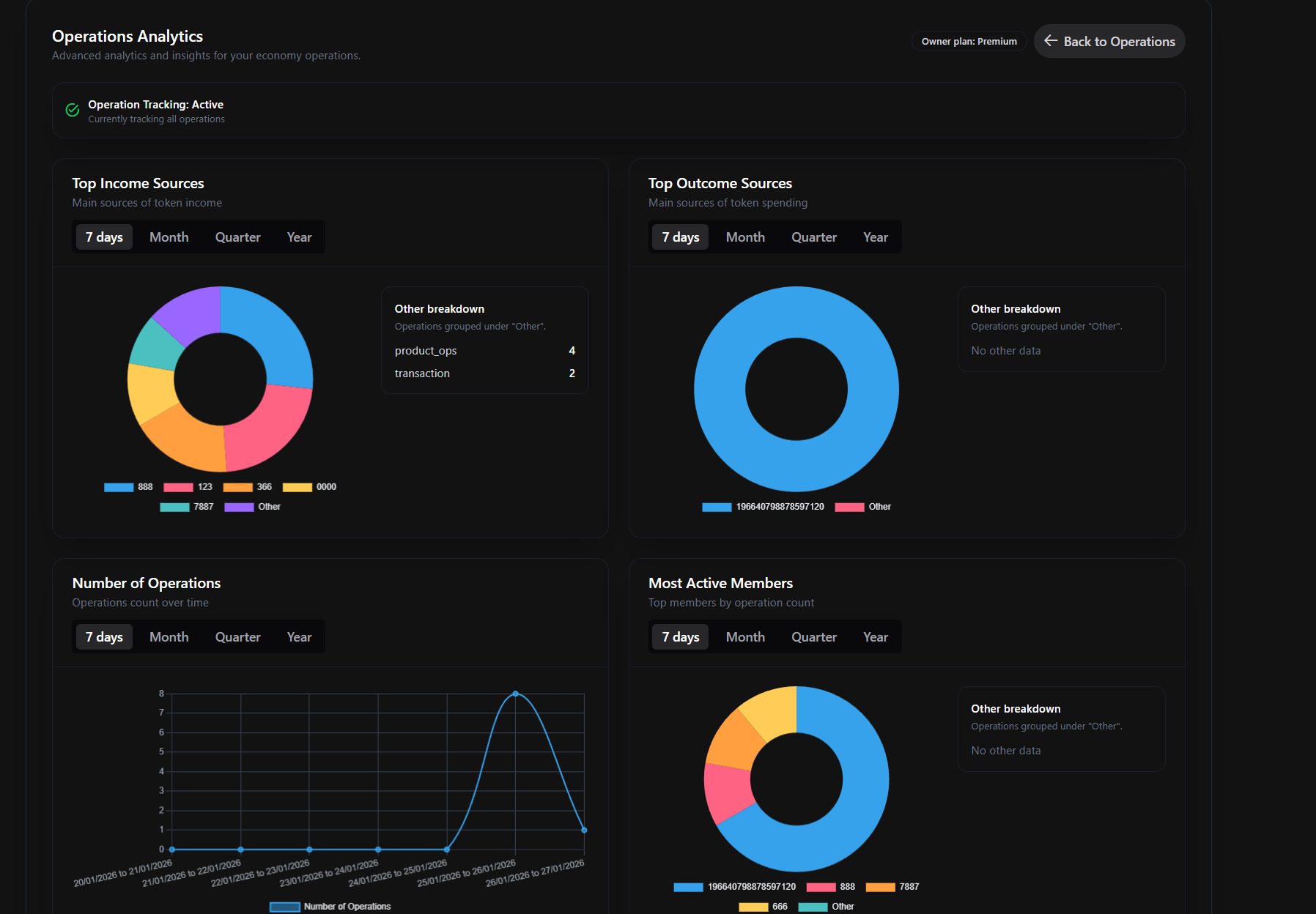
On the analytics page, you can see the analytics of the operations that have been made on your server. You can see the top 5 sources of incomes and outcomes, the top 5 members that have created operations, and the number of operations per type of operation over time.
Incomes
The incomes are the operations that are adding tokens to your server members' balances. On the top-left corner of the analytics page, you can see a doughnut chart representing the different sources of income for your server. This chart represents the top 5 incomes of your server and then categorizes the others into operation types under the Other category.
For product operations, the name associated with the token value will be the Product ID of the product that gave X tokens to the member (it means that the user purchased a product with real money that gave them tokens). The other types are defined by the member Discord ID who emitted the tokens.
Outcomes
The outcomes are the operations that are removing tokens from your server members' balances. On the top-right corner of the analytics page, you can see a doughnut chart representing the different sources of outcomes for your server. This chart represents the top 5 outcomes of your server and then categorizes the others into operation types under the Other category.
For product operations, the name associated with the token value will be the Product ID of the product that removed X tokens from the member (it means that the user purchased a product with their tokens). The other types are defined by the member Discord ID who emitted the tokens.
General Note
Note that the analytics for incomes and outcomes sum the total number of tokens emitted/received by member/product X under operation Y and takes the top 5. It can really help you identify where your members are spending their tokens and where they are getting them.
Number of Operations
The number of operations line chart represents the number of operations that have been made on your server over time. It is a line chart that represents the number of operations per type of operation over time. It can help you identify when your server is the most active and what the most active operations on your server are.
Most Active Members
The most active members doughnut chart represents the top 5 members that have created the most operations on your server. It can help you identify who the most active members on your server are in terms of token flow.
Questions?
If you have any questions about the operations and analytics page, you can join the support server and ask your question; I will be happy to answer it!